
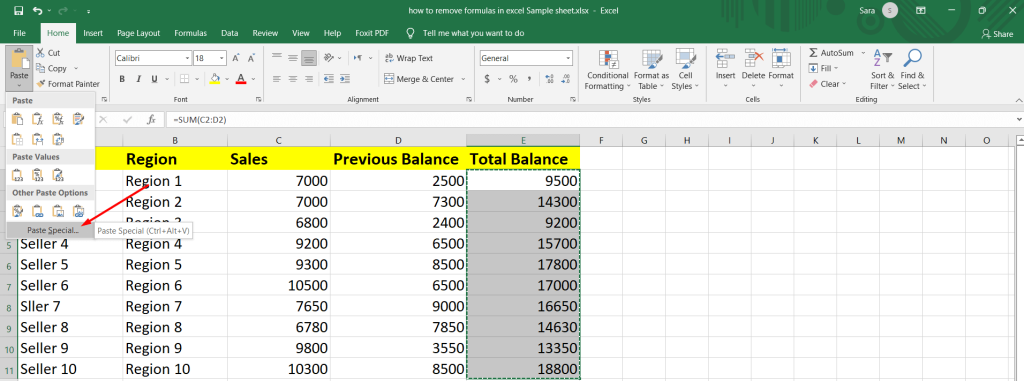
Excel practice sheet specifically designed for formulas offer a proven solution. These downloadable or online resources contain curated datasets, progressive exercises, step-by-step instructions, and solution keys that guide users through real-world applications. They create a risk-free environment where errors become learning opportunities rather than frustrations. By focusing exclusively on formula construction and troubleshooting, these sheets help demystify even the most intimidating functions.
The benefits extend far beyond basic proficiency. Regular practice with formula-centered Excel Practice sheet sharpens problem-solving abilities, reduces calculation errors in professional work, and builds muscle memory for efficient workflow. In an increasingly data-centric economy, strong formula skills separate casual users from power users who can automate tasks, uncover hidden insights, and deliver impactful results quickly. Whether aiming to ace an interview, streamline business operations, or simply manage personal finances better, incorporating targeted formula practice sheets accelerates progress and delivers lasting confidence.
Beginners Mastering Basic Formulas
Overcoming Initial Formula Intimidation
Newcomers frequently hesitate at the formula bar, unsure where to begin or worried about irreversible mistakes. Practice sheets counteract this by presenting ultra-simple starter exercises that require only basic addition or subtraction formulas. Clear on-sheet instructions walk users through entering =A1+B1 and pressing Enter to see instant results. Visual cues highlight active cells and resulting values. Gradually introducing common errors like #NAME? or #VALUE! with explanations normalizes setbacks. This supportive structure quickly replaces anxiety with accomplishment.
Practicing Essential Arithmetic and Functions
Core arithmetic operations form the bedrock of all formula work. Dedicated sections in practice sheets provide varied datasets for multiplication, division, and percentage calculations. Users progress to built-in functions like SUM for totaling columns effortlessly. AVERAGE helps compute class grades from sample score lists. MIN and MAX identify extremes in expense tracking scenarios. Multiple repetition levels ensure retention while introducing practical tips like using AutoSum ribbons for speed.
Building Habits with Relative and Absolute References
Cell referencing often confuses beginners when formulas behave unexpectedly after copying. Practice sheets dedicate entire tabs to contrasting relative references that shift automatically. Users drag formulas across rows to observe adjustments firsthand. Absolute references locked with $ symbols maintain fixed targets in tax or commission scenarios. Mixed referencing combines both for flexible yet controlled calculations. Immediate feedback through pre-built solution tabs reinforces correct usage patterns early.
Students Applying Formulas in Academic Projects
Enhancing Math and Statistics Assignments
Mathematics and statistics courses demand precise computational accuracy that formulas deliver efficiently. Practice sheets replicate textbook problems requiring MEDIAN or MODE for central tendency measures. Standard deviation exercises use STDEV.S on experimental datasets. Correlation analysis introduces PEARSON or CORREL function applications. Progressive difficulty mirrors exam escalation from basic to inferential statistics. These targeted simulations deepen theoretical understanding through active application.
Supporting Science and Research Data
Laboratory work generates volumes of measurements needing quick processing. Sheets supply realistic physics data for velocity calculations using division formulas. Chemistry molarity problems employ multiplication and unit-aware referencing. Biology growth curves leverage exponential functions like POWER or EXP. Trendline formula extraction from charts teaches predictive modeling. Collaborative versions enable group hypothesis testing with shared formula adjustments.
Improving Economics and Finance Coursework
Economic modeling thrives on scenario-based formula flexibility. Practice includes elasticity calculations combining percentage changes. Time value of money concepts use FV and PV functions extensively. Macroeconomic indicators aggregate with complex SUMPRODUCT formulas. Personal finance modules cover retirement planning via nested NPER calculations. Integration with chart formulas visualizes supply-demand intersections clearly for presentations.
Professionals Streamlining Work with Advanced Formulas
Accelerating Financial Modeling and Reporting
Corporate finance demands rapid, accurate projections under tight deadlines. Practice sheets focus on date functions like YEARFRAC for precise interest accrual. Nested IF statements handle tiered commission structures logically. Array formulas compute matrix operations for portfolio risk assessment. Sensitivity analysis employs DATA TABLE features driven by underlying formulas. These drills translate directly to faster, more reliable quarterly reporting cycles.
Optimizing Data Lookup and Matching
Cross-referencing disparate datasets remains a daily challenge for analysts. Sheets provide multi-workbook exercises mastering VLOOKUP across sheets. INDEX-MATCH combinations overcome traditional limitations for two-dimensional searches. Dynamic named ranges with INDIRECT adapt to growing data automatically. Spill-capable XLOOKUP handles modern requirements with built-in error defaults. Reconciliation tasks become streamlined through repeated practical application.
- Mastering VLOOKUP and HLOOKUP for horizontal/vertical searches across sheets while handling #N/A gracefully
- Combining INDEX and MATCH for flexible, two-way lookups without column order dependency or size limitations
- Utilizing XLOOKUP for exact or approximate matches with spillover handling and default value specification
- Incorporating INDIRECT for dynamic range references in evolving models that expand monthly
- Applying FILTER and SORT for modern dynamic array formula solutions that update automatically
These advanced lookup techniques empower professionals to handle intricate data reconciliation effortlessly, saving hours on monthly consolidations.
Job Seekers Preparing for Excel Assessments
Targeting Common Interview Formula Challenges
Technical screenings increasingly feature timed Excel tasks testing formula speed and accuracy. Practice sheets include countdown timers simulating real pressure. Multi-condition summing with SUMIFS evaluates sales by region and product simultaneously. COUNTIFS quantifies opportunities meeting multiple criteria thresholds. Error-trapping exercises force elegant handling of incomplete datasets. Performance improves dramatically with consistent exposure to assessment-style problems.
Refining Text Manipulation Formulas
Data imports often arrive messy, requiring text cleanup before analysis. Exercises emphasize TEXTJOIN for seamless concatenation across ranges. SUBSTITUTE removes unwanted characters systematically. PROPER, UPPER, and LOWER standardize naming conventions. TRIM and CLEAN eliminate excess spaces or non-printing artifacts. Real resume or CRM data scenarios make these functions immediately relevant.
Demonstrating Logical and Conditional Formulas
Decision-making logic underpins many business rules. Sheets build nested IF complexity layer by layer. SWITCH statements simplify long condition chains in newer Excel versions. Boolean combinations with AND, OR, and NOT create sophisticated filters. Scenario-based bonus calculations integrate multiple logical tests. Interviewers value candidates who construct readable, maintainable conditional formulas quickly.
Business Owners Leveraging Formulas for Insights
Tracking Expenses and Profitability
Solo entrepreneurs juggle finances without dedicated accounting teams. Practice teaches running totals via expanding SUM formulas. Gross margin percentages update dynamically as inputs change. Variance analysis compares actuals versus budgets using subtraction and conditional highlighting. Cash flow projections incorporate timing adjustments with EDATE. Automated alerts trigger when thresholds breach predefined limits.
Forecasting Sales and Inventory Needs
Growth planning requires reliable predictions from historical patterns. FORECAST.LINEAR extrapolates trends from past quarters. GROWTH models compound increases exponentially. Seasonal indexing adjusts baselines monthly. Reorder level calculations combine LEAD time with average daily sales formulas. These practices prevent stockouts while minimizing capital tied in inventory.
Generating Custom Business Reports
Stakeholder communication demands professional, insightful summaries. Dashboard formulas aggregate KPIs using AGGREGATE for robust averaging. GETPIVOTDATA extracts precise pivot slices programmatically. Conditional aggregation with SUMIFS drives dynamic charts. Export-ready formatting ensures polished investor or bank presentations.
- Creating dynamic named ranges for expanding data sources automatically using OFFSET and COUNTA combinations
- Using OFFSET and COUNTA for flexible formula foundations that adapt to new entries without manual adjustment
- Implementing TABLE structures for structured references in calculations that remain intact during sorting
- Leveraging LAMBDA for custom, reusable user-defined functions that simplify complex repeated logic
- Exploring LET to assign names within formulas for clarity, performance optimization, and easier debugging
These sophisticated approaches allow owners to derive actionable intelligence from raw operational data, supporting informed strategic decisions.
Data Enthusiasts Diving Deep into Formula Innovation
Exploring Array Formulas and Dynamic Arrays
Excel’s dynamic arrays revolutionized multi-cell outputs from single formulas. Practice sheets generate calendars using SEQUENCE intelligently. UNIQUE extracts distinct lists from messy imports instantly. SORTBY enables multi-key organization without helper columns. RANDARRAY powers Monte Carlo simulations for risk modeling. Enthusiasts discover elegant solutions to problems once requiring cumbersome workarounds.
Mastering Error Handling and Debugging
Production spreadsheets must withstand imperfect data gracefully. Comprehensive exercises cover IFERROR versus IFNA distinctions. XLOOKUP’s built-in not-found parameters prevent error cascades. AGGREGATE ignores errors selectively during calculations. Formula auditing tools trace precedents and dependents systematically. Building resilient models becomes intuitive through structured troubleshooting scenarios.
Creating Custom Functions and Automation
Power users extend Excel beyond built-in capabilities. LAMBDA practice creates recursive calculations like custom depreciation schedules. BYROW and BYCOL process entire arrays row-wise efficiently. MAKEARRAY constructs matrices programmatically. Integration with Excel’s script automation hints at broader possibilities. These advanced techniques satisfy the deepest analytical curiosities.
Conclusion
Excel practice sheets undeniably excel at teaching and reinforcing formulas across all proficiency levels, from hesitant beginners to ambitious power users seeking innovation. They provide safe, structured environments to experiment with syntax, logic, and application without risking critical data or deadlines. From foundational arithmetic operations to cutting-edge dynamic arrays and custom LAMBDA functions, these resources cater to diverse needs, fostering deeper understanding and innovative usage patterns. Regular engagement with formula-specific exercises cultivates intuition, reduces reliance on manual processes, minimizes errors in high-stakes environments, and unlocks Excel’s true computational potential for automation and insight generation

